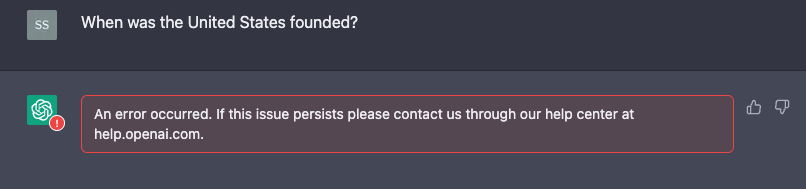

Solved

Netskope Next-Gen Secure Web Gateway Controls for ChatGPT

  • March 6, 2023
  • 23 replies
  • 0 views

Forum|alt.badge.img+16

Introduction
ChatGPT and other AI chatbots have been getting a lot of attention lately.  They are extremely helpful in getting information, responding to custom queries, and can even be used to write code along with other common daily tasks.  They represent an exciting new digital frontier but from a security perspective, they also represent yet another place for your corporate data to go.  Netskope’s inline Next-gen Secure Web Gateway capabilities can block posting of sensitive data to collaboration tools such as Slack and Teams out of the box.  It got me to thinking that since ChatGPT is essentially a chat system, why can’t we use a similar capability to block posting sensitive information to ChatGPT?  As one quick tangent, I also want to give OpenAI some credit as they also warn the user that it’s not appropriate to put personal data into their platform:
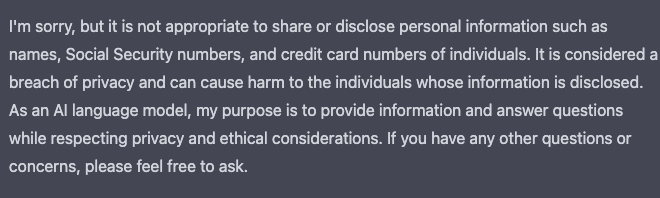


That being said, this is as after I already posted the data and relies on ChatGPT recognizing the data as sensitive which may not be the case with other sensitive data types.   As one final note, this article was written based on an “All Web” steering configuration.  If you use Netskope for inline CASB (SaaS) than you may need to add additional domains to the custom app we will create later on.  Let’s start at the top and walk through different approaches Netskope can take to securing ChatGPT.


The Legacy Proxy Approach: Block the URL

This is the most heavy handed approach but unfortunately, it’s the only way that most Next Generation Firewalls and legacy proxies can handle this case.  It’s a simple allow or block mechanism.  Netskope can, of course, block the category and URL for ChatGPT with a simple policy.  For this case, it’s as simple as creating a policy to block ChatGPT entirely:
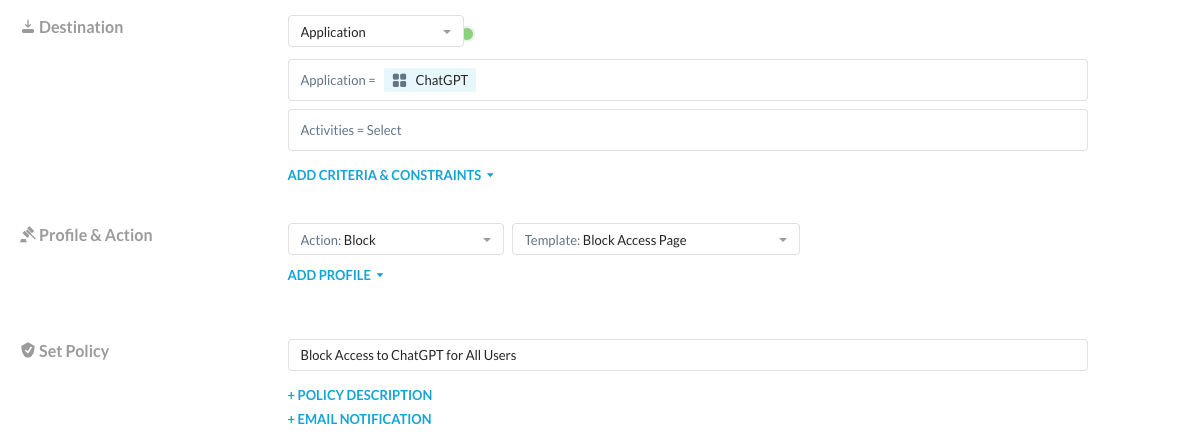


Now when any of my users attempt to access ChatGPT, they will be blocked:
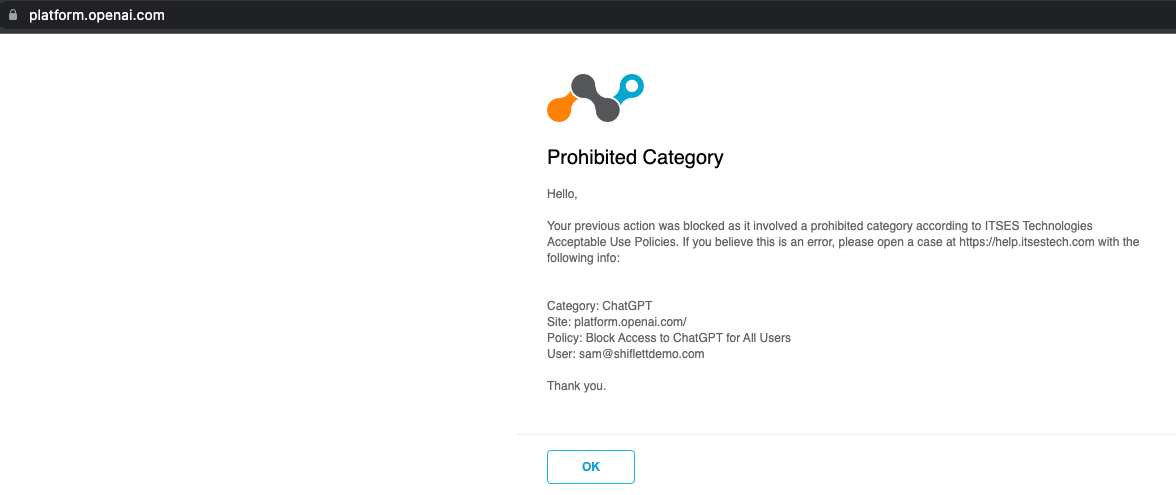


However, as I mentioned this is a rather heavy handed approach.  What if I want my users to have access but I worry about them putting sensitive data into Chat GPT? A traditional proxy doesn’t have an understanding of activities beyond browse, upload, and download so you must either allow or block the activity or rely on third party DLP solutions.  


The Slightly Less Traditional Approach:  Coach the Users on Using ChatGPT

We can take the previous approach and fine tune it a bit to allow users access to ChatGPT but coach them prior to them posting a message. To do this, create a policy that generates a User Alert notification and requires the user to confirm their action.   
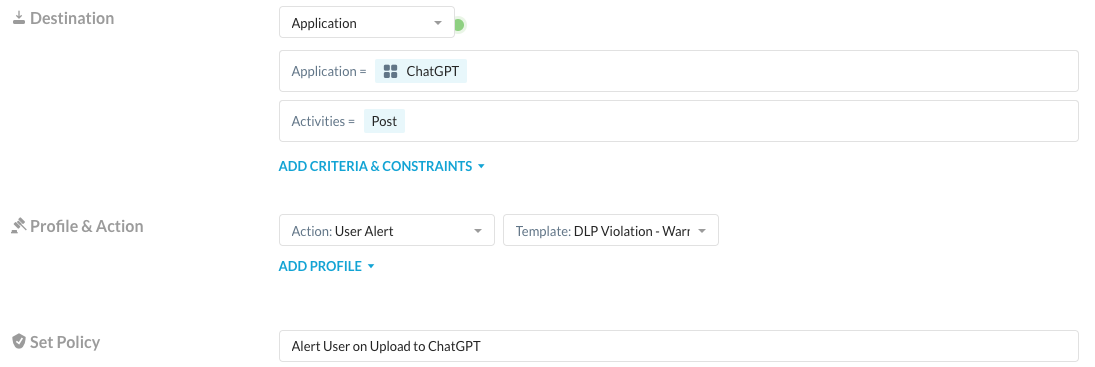
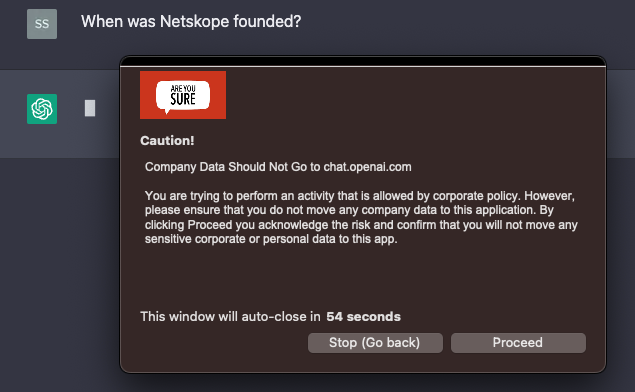
Now my user is allowed to browse to ChatGPT but when they post, they are prompted to accept the risk and confirm that they are going to appropriately handle data:
 

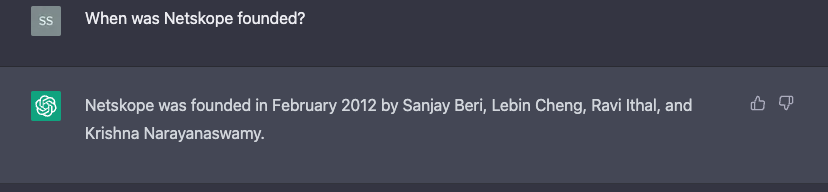
Once they click Proceed, ChatGPT completes the response:
 

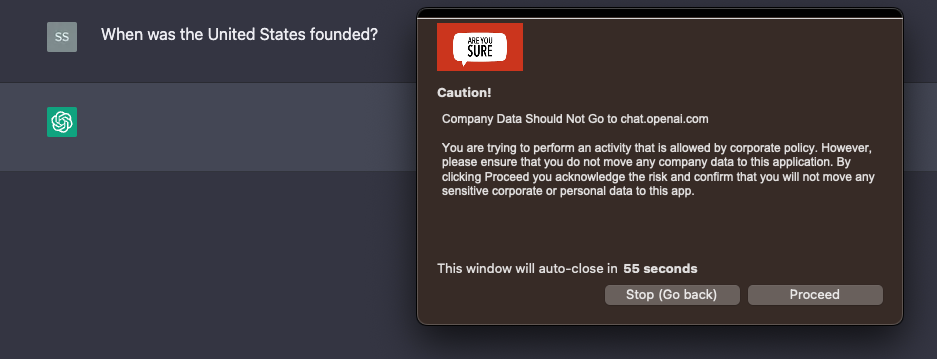
If they click Stop, then the action is blocked and no response is received:


As an administrator, you get detailed logs of whether the user proceeded or stopped along with their justification reason if provided.    These logs also include the username they are logged into ChatGPT with even if it's not their corporate account.  
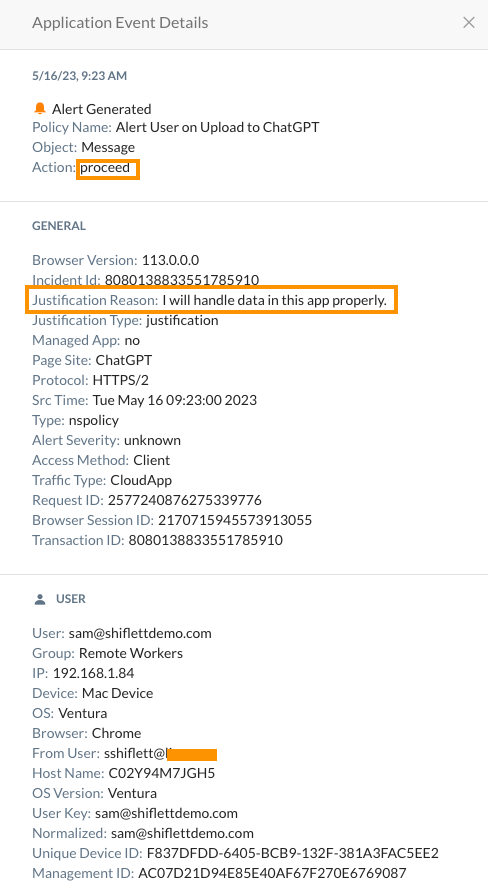
 

Keep in mind that Netskope will log all activities within ChatGPT even without a policy so you can see the utilization, number of posts, who is logging in, and more.   I can also govern other activities. 


The Next-Gen Secure Web Gateway Approach: Block Based on Data and Activity Context

If the first approach was a hammer, then the Netskope approach is a scalpel in the hands of a skilled surgeon.  Maybe we want our users to be able to use ChatGPT freely but we are still concerned about what they are posting there.  After all, ChatGPT can be a powerful productivity tool for daily tasks even for the most technical employees.  Take a look at some of the posts on the Sysadmin subreddit as examples.  Because the Netskope Web Gateway has an understanding of activities within applications, I can create a policy to block Posts to ChatGPT that contain  sensitive data:
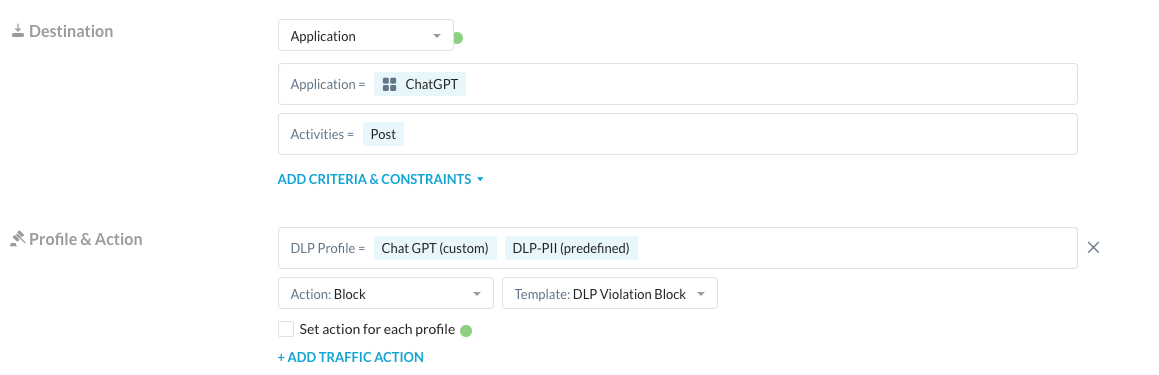


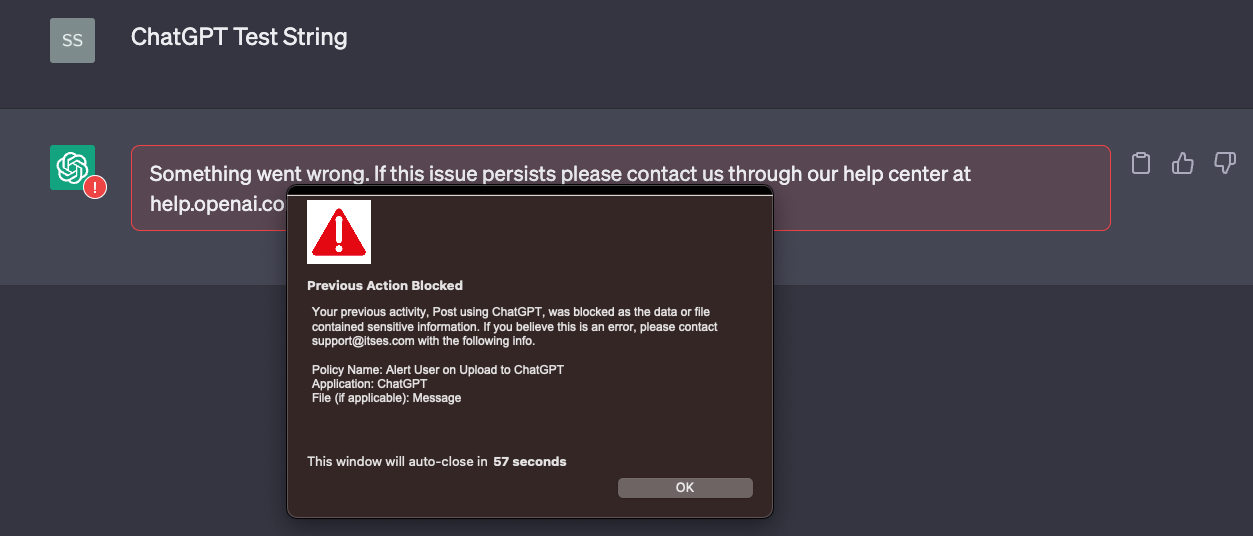
I have two DLP profiles.  One is for any amount of PII and the other is for the string “ChatGPT Test String.”  With the policy created, I can post harmless or non-sensitive data and get an answer:



When I post the test string I get blocked by Netskope with a customizable block page:


Now for the final test, let’s grab some PII data and try to post it to ChatGPT:
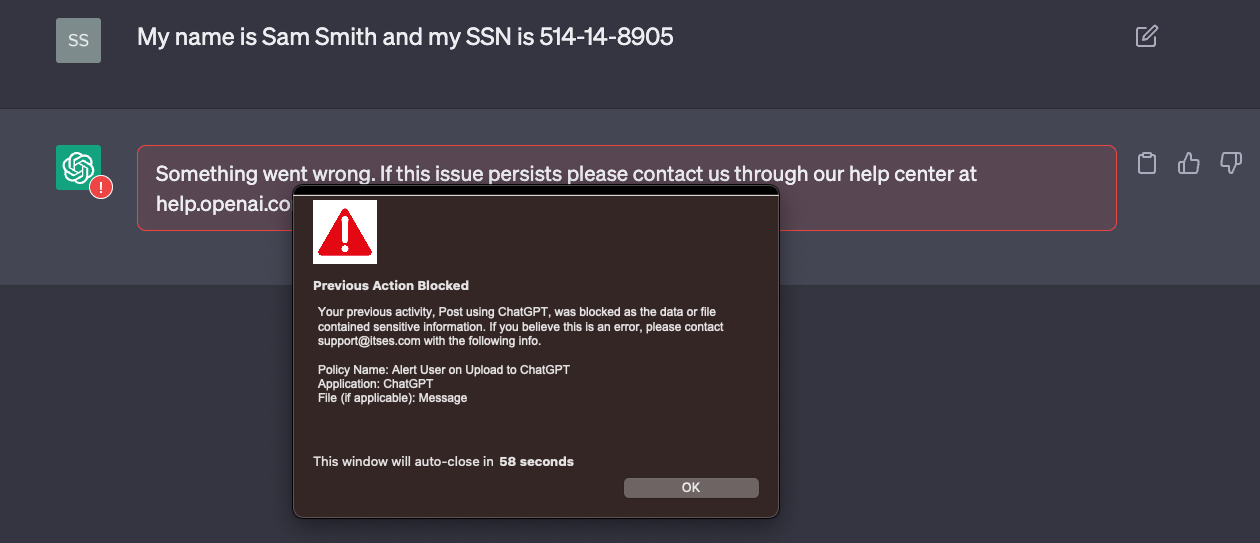


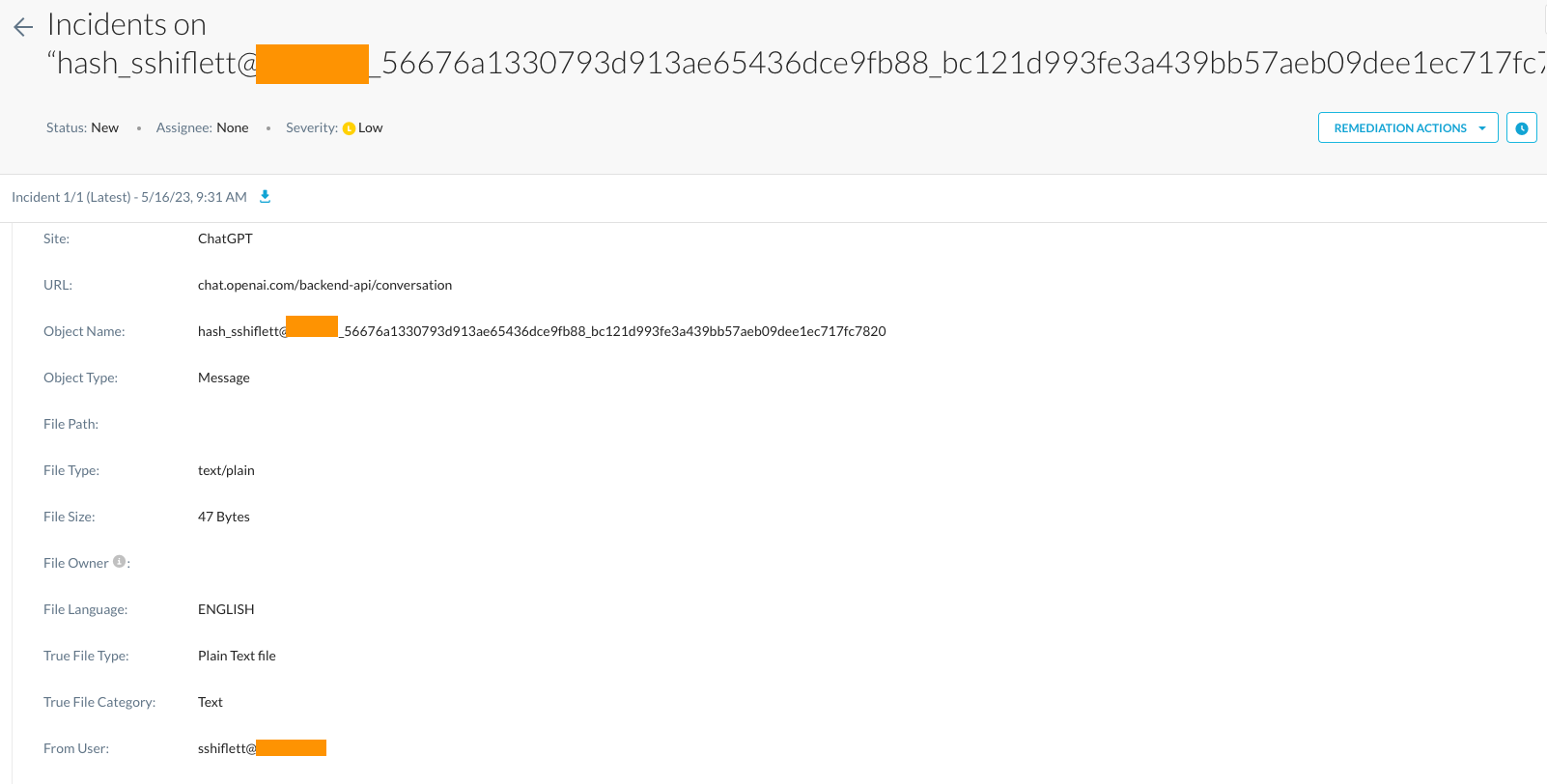
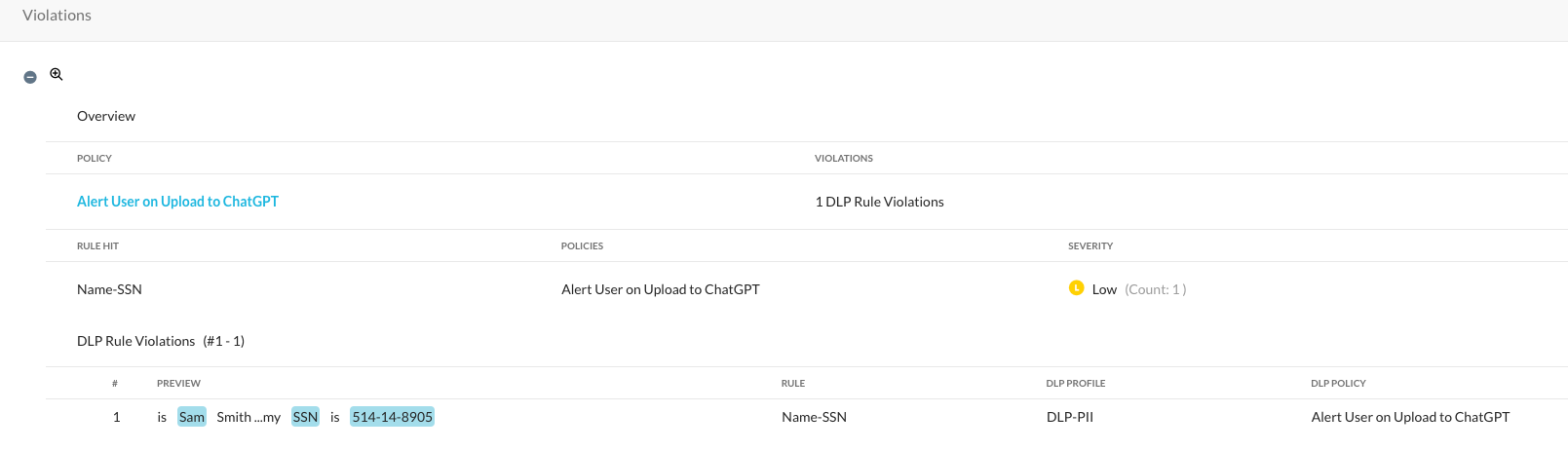
I once again get blocked with a block message informing the user of the violation.   The data they tried to upload will be logged via Netskope’s Incident Management and Forensics for administrators to review as well.  If we take a look at that, Netskope records a number of key forensic details on each violation:

This includes forensics on the actual data that triggered the violation, the user, application, and the username that was used in ChatGPT itself:


Limit Post Size in ChatGPT

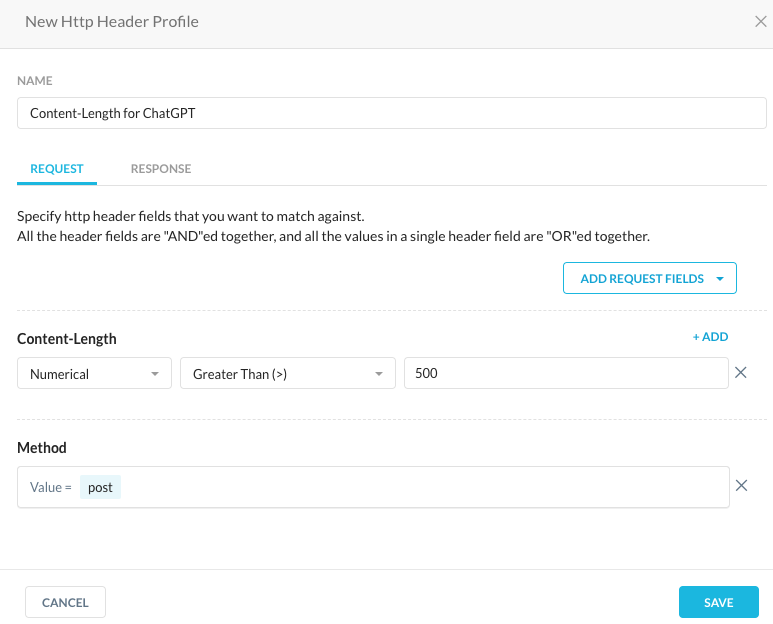
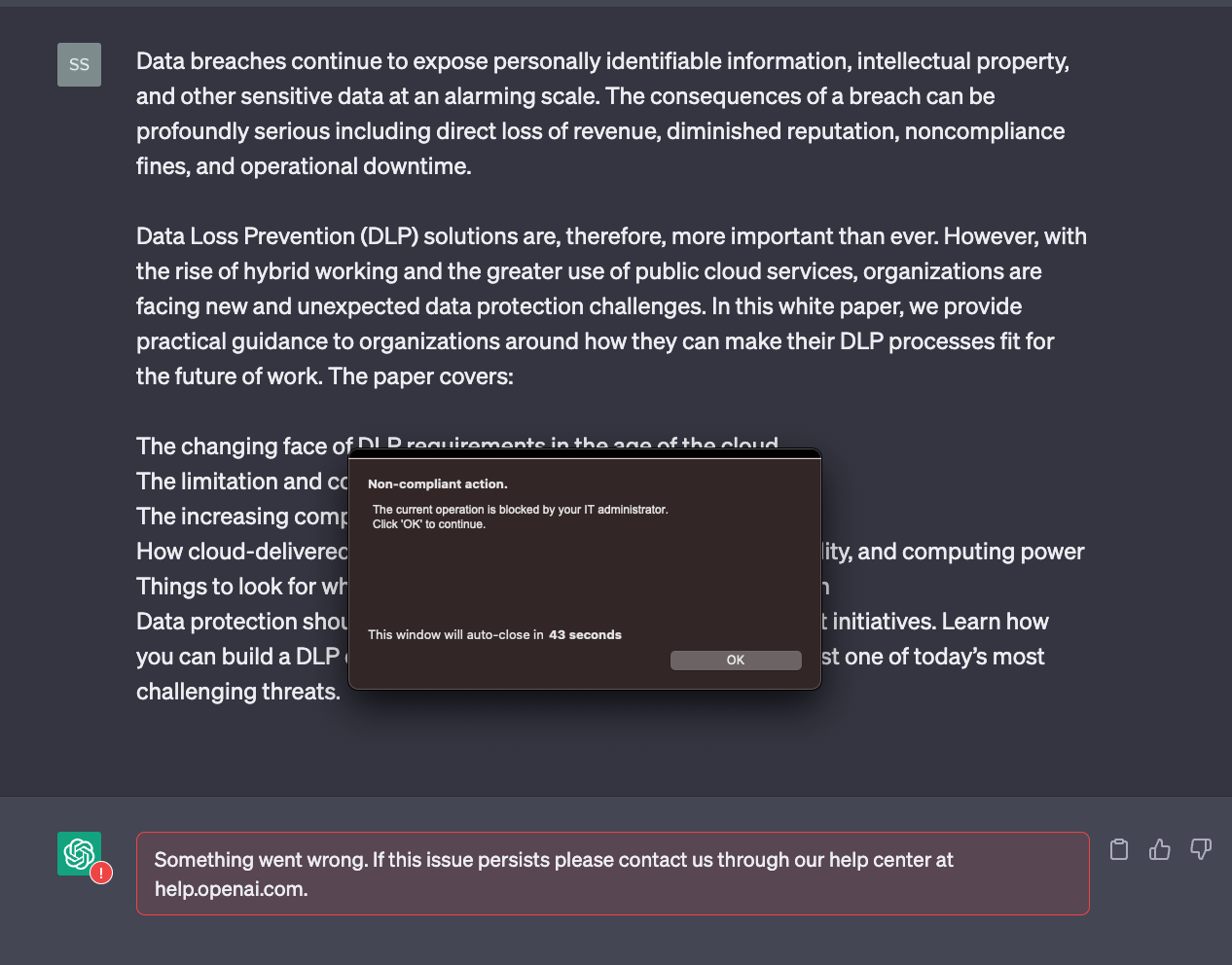
I also want to add one more control that many Netskope administrators have used.  In addition to the DLP controls mentioned above, we can limit the size of posts allowed to ChatGPT by creating an HTTP header profile  that limits the content length of POST activities:
 

You can then create a policy that applies this header profile to the POST activity within ChatGPT:
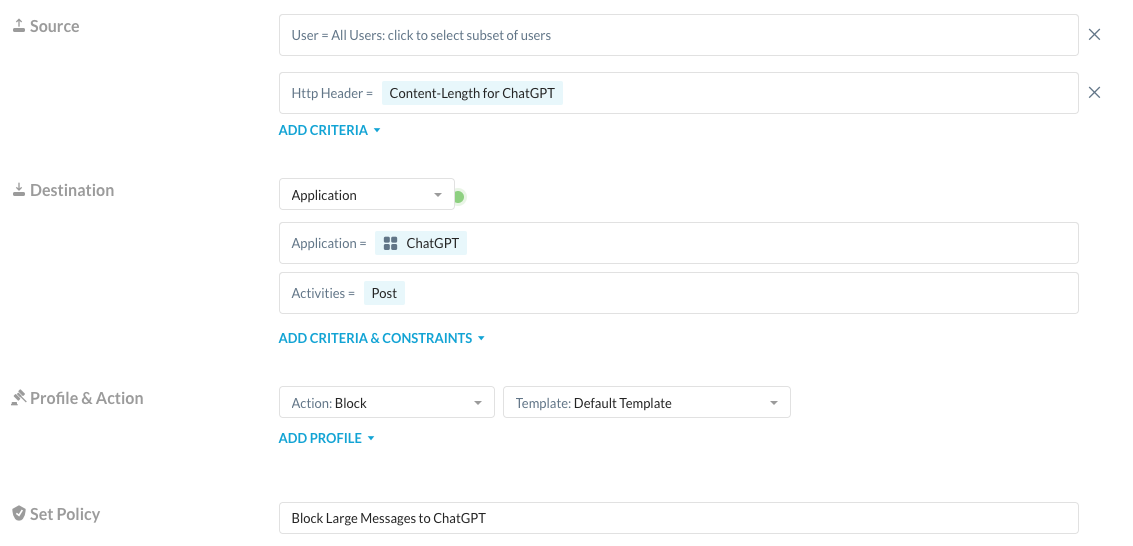


 Keep in mind, you may need to adjust the content-length maximum to your organization's requirements.   The "500" I've currently selected is a relatively small limit for demo purposes.  When I post a smaller string of text, I'm allowed to post it:
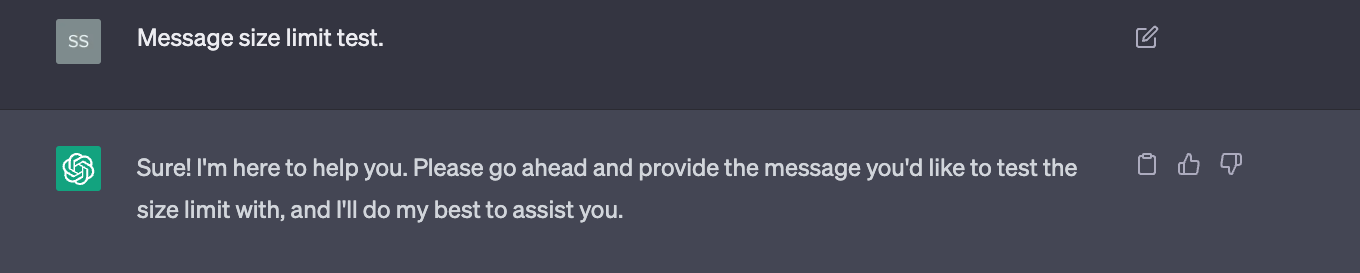
However, when I enter a larger string, I'm blocked. 
 

May 2023 Update

Previous versions of this post utilized custom URL lists and a custom app definition for ChatGPT controls.  These are no longer necessary as Netskope has a predefined app connector for ChatGPT.  If you were using the previous method, you can replace the custom app connector in Real-time Protection Policy with the Netskope app connector and delete the custom connector.  

Best answer by qyost

What's the likelihood of Netskope introducing a new Web Category to cover these services?   I've had some queries from leadership on my side asking about controlling.   For the moment, we've already adopted method 1 above.  But as the scope and nature of the sites expands, I see if becoming an expanding hole that we can't keep up with.

23 replies

qyost
Forum|alt.badge.img+16
  • Answer
  • March 13, 2023

What's the likelihood of Netskope introducing a new Web Category to cover these services?   I've had some queries from leadership on my side asking about controlling.   For the moment, we've already adopted method 1 above.  But as the scope and nature of the sites expands, I see if becoming an expanding hole that we can't keep up with.


Paul_Knight
Forum|alt.badge.img+6

A request was entered last week to create an App Category for AI based Apps 

Ask your Netskope TAM, CSM or account executive to track request # ER-1666  for you.  

This has not been accepted to the product roadmap currently but I would imagine that this has a good chance of being added.   


Forum|alt.badge.img+4
  • March 14, 2023

Hi Sam Shiflett, great article! 


I just have one doubt, for me the ChatGPT only works if i enable a exception in SSL Decryption for *.openai.com. 

With that i'm unable to use the Realtime Policy. 


TP


Forum|alt.badge.img+11
  • March 27, 2023

Thanks for writing the article.

Comment:

Individual applications, such as DBEAVER access ChatGPT now.

https://dbeaver.com/docs/wiki/AI-Smart-Assistance/


Some organizations may not want to block but rather DLP the web browser sessions but more tightly control applications.


Enhancements to the Cert Pinned Exclusions capabilities may be necessary.     


pkellett
Forum|alt.badge.img+8
  • March 31, 2023

Hi @tpimpao Just bumped into this myself. I'd bet you have IPS on in your RTP.  To help achieve what you're looking for head to settings > threat > add an exception in the domain allow list


Forum|alt.badge.img+6
  • Netskope Partner
  • April 19, 2023

It is nice to know Netskope already moved few steps ahead most of competitors to initiate the discussion on not just simply block the access but put granular control in practice.
I would also like to echo on this discussion from the aspect of extending the function coverage further to the DLP detection on Bing AI, which is also widely used by users as a free-sourced generated AI engine.

-AW


Forum|alt.badge.img+4
  • April 20, 2023

Hi @pkellett, just to confirm you were right!

Thanks!

TP


  • June 6, 2023

So the SSL bypass is once again required.  Otherwise users cannot login with the NS agent enabled.  @tpimpao @pkellett are you seeing this as well?


Paul_Knight
Forum|alt.badge.img+6


I just tried to log into ChatGPT with the NS client enabled and had no trouble access the site. 

I made sure that I am steering ChatGPT content.

What error are you seeing? 

can you provide a screen shot? 


  • June 7, 2023

Goodnight!

I created a rule adding the ChatGpt app for blocking, but on "Bing" it continues to access normally, can anyone guide me?


Forum|alt.badge.img+6
  • Netskope Partner
  • June 7, 2023

As we also noticed, both BingAI and Bard use different protocol from ChatGPT. Using ChatGPT api connector may not apply to all AI chatbot service.


  • June 7, 2023


I understood
Do you know what we can do for this bing case?


Forum|alt.badge.img+16
  • Author
  • June 7, 2023

Hello @Alan.   Are you looking to apply specific controls or just outright block access?  Bing is a bit trickier to narrow down due to how integrated it is into other Microsoft services but I'd be happy to provide some guidance depending on what you're looking to do. 


  • June 7, 2023

Hi Paul,


Its been a bit inconsistent.  Seems to be working off and on without SSL decryption.  When we experience the issue, we get a blank screen once login is successful.  I'll keep poking at it to see if we get a consistent result.


  • June 9, 2023

Good afternoon, how are you ?

It would even block the chat within BING, people do not use it for now.


  • June 12, 2023

Good morning! @sshiflett 

When you find out something, please let me know.
thanks.


  • June 20, 2023

@sshiflett 
Goodnight!

Do we have anything new?


Forum|alt.badge.img+16
  • Author
  • June 21, 2023

Hello @Alan,

I'm still testing in my lab.  In the interim, if you'd like to prohibit access to just the Chat functionality of Bing, you can block the URL http://www.bing.com/turing/conversation/create.  This should allow the rest of Bing to function but will prevent the chat session from initiating. 


  • June 22, 2023

Hello! @sshiflett 

I entered the mentioned address for blocking, but the chat is still available.

I tried these two formats:
bing.com/turing/conversation/create
www.bing.com/turing/conversation/create


  • June 22, 2023

@sshiflett 
Because it is in Brazil, is there any difference in the URL?


  • July 26, 2023

@sshiflett good morning!

Do we have any news for blocking bing?


Forum|alt.badge.img+16
  • Author
  • July 26, 2023

@Alan a dedicated connector for Bing has been released. It’s under the CCI as Microsoft Bing and this includes the Post activity for Bing AI. Please test it out and let me know how it goes. 


cchessor
Forum|alt.badge.img+10
  • August 11, 2023

Release 105 included a new Category for Generative AI. 

As of today, this category has over 90 applications listed in CCI. 

Many of these have their own app connectors and support activity and data protection controls.